Choose your language

Choose your language

The website has been translated to English with the help of Humans and AI

Dismiss

Apple, Google, Privacy, and Bad Tech Journalism

Apple, Google, Privacy, and Bad Tech Journalism

5 min read
Profile picture for user Julien Coquet

Written by
Julien Coquet
Senior Director of Data & Analytics, EMEA

Apple, Google, Privacy, and Bad Tech Journalism

Wait, did they just say Safari now blocks Google Analytics?

(Spoiler alert: it doesn’t)

At the 2020 edition of the Apple Worldwide Developers Conference (WWDC), Apple announced that the new version of MacOS (nicknamed Big Sur) would ship with version 14 of the Safari web browser - promising Safari would be more privacy friendly. Which is a great move and in line with the regulatory and digital marketing landscapes.

However, based on fuzzy, out-of-context screenshots shown during the announcement, some digital marketing publications started asserting that the new Safari would block Google Analytics.

[Narrator’s voice: it didn’t]

Here are some of the articles in question:

Within minutes, that poorly researched bit of fake news was all over social media.

So what really happened? Should you worry?

Cooler heads always prevail, so let’s take a step back and look closely at what really happened.

What is ITP and why does it matter?

The WWDC is generally the occasion for Apple to announce new features and key developments in their tech ecosystem from desktop and mobile operating systems to SDKs, APIs, and all that good technical stuff.

In recent years, Apple has used the WWDC to announce changes to the way they handle privacy in web and mobile apps, namely with initiatives such as ITP (Intelligent Tracking Protection), which is used in Safari, Apple's Webkit-based browser on Macs, iPhones, and iPads.

In a nutshell, ITP restricts the creation and the lifetime of cookies, which are used to persist and measure someone’s visit on one site (first party, a.k.a. 1P) or across multiple websites (third party, a.k.a. 3P). ITP makes things more difficult for digital marketers because users become harder to track and target.

If we use Google Analytics as a comparison, ITP can "reset" a known visitor to a new visitor after only a couple of days, instead of the usual 2 years - assuming users don’t change devices or clear their cookies.

If we look at ITP with our privacy hat on, even collecting user consent will not stop ITP from neutralizing cookies.

ITP arrives at the right moment; just as online privacy starts to finally take root with pieces of legislation such as GDPR and ePrivacy in Europe, CCPA in California, LGPD in Brazil, APA/NDB in Australia, APP in Japan, PIPA in Korea, and a lot more being made into bills and/or written into law.

Arguably the above pieces of legislation allow for the collection of user consent prior to collecting. So we should not really be worrying about Safari potentially collecting information that users consented to, right?

That was not even a consideration in the aforementioned pieces on "Safari blocks Google Analytics."

Does the new Safari really block Google Analytics?

(Second spoiler alert: it still doesn't)

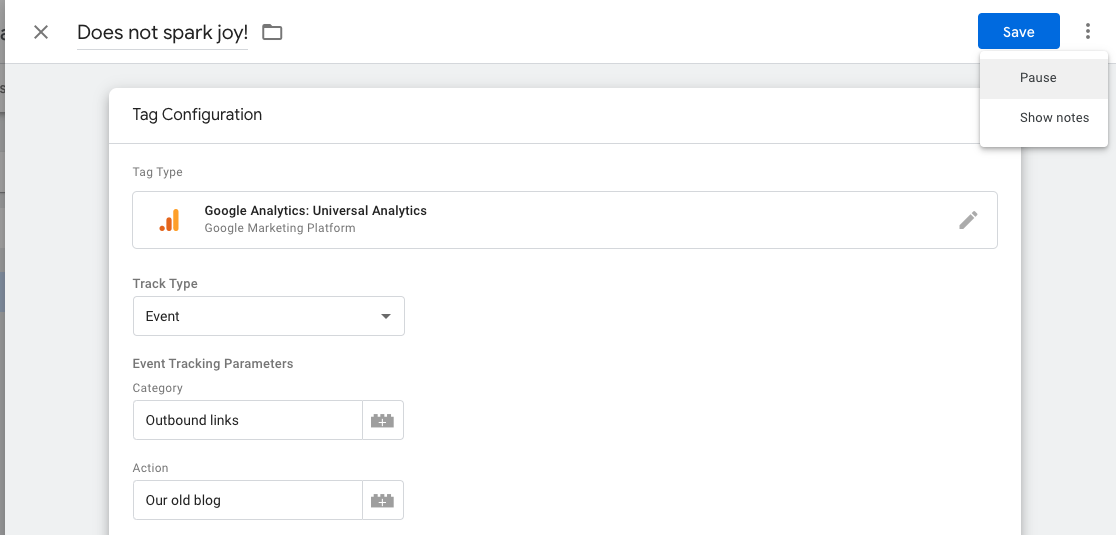
The most obvious way to show you is with a test. Luckily, I had MacOS Big Sur beta installed so I took a look under the hood - especially on the sites that published that "Safari blocks Google Analytics" story. Let's fire up Safari and turn on developer mode.

Bad Tech Journalism

Sure enough, Google Analytics sends a tracking call that makes it home to Google collection servers. Safari does not block Google Analytics.

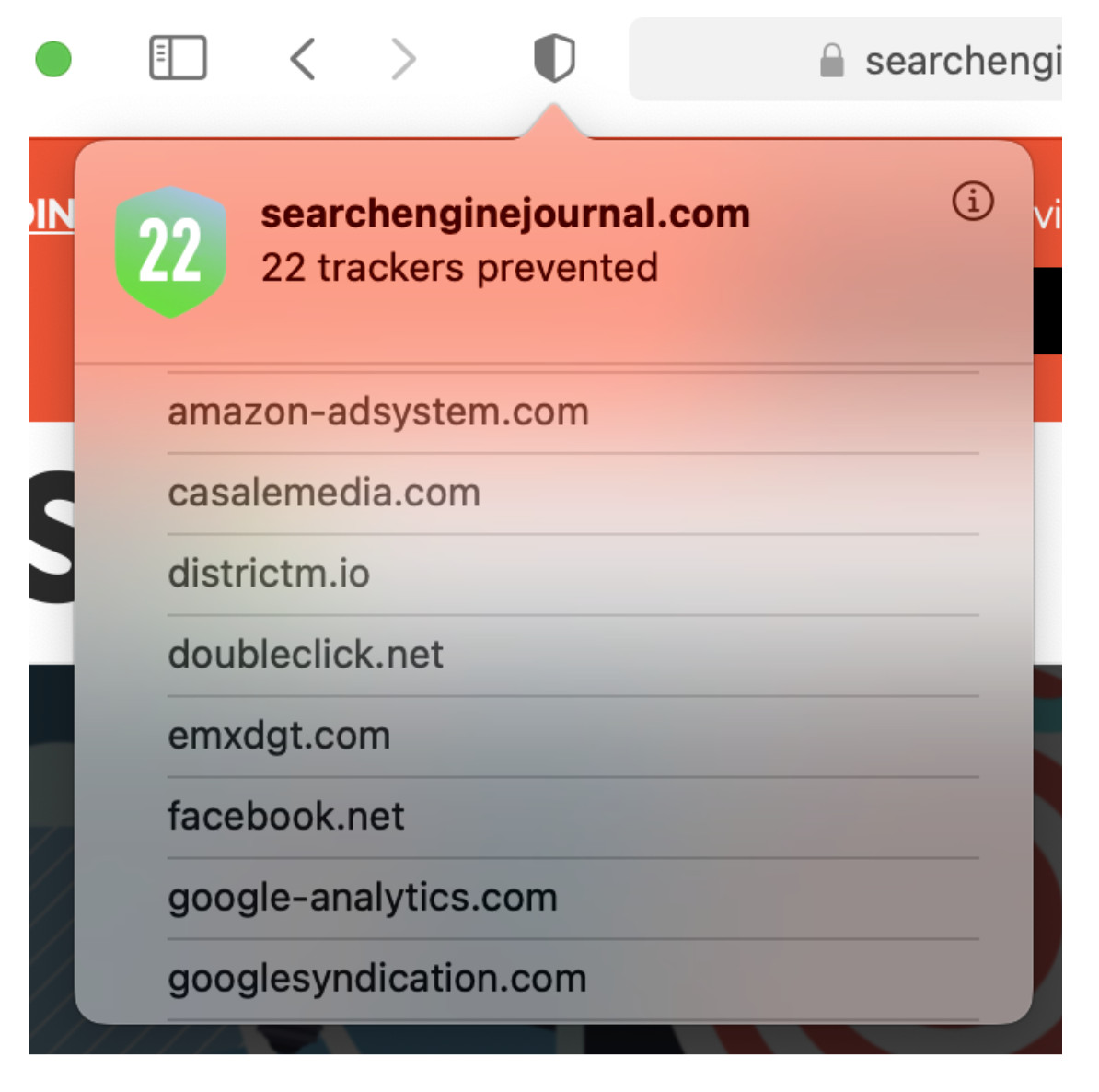
Now let's take another look at that new privacy report: it shows "22 trackers prevented."

Wait, the list shows google-analytics.com?! Didn't we just establish that Google Analytics tracking went through?

Let's clarify: what the panel below shows are the domain names of resources loaded by the page that are flagged in the ITP lists as potential tracking vectors using third-party cookies.

Bad Tech Journalism

Other than that, ITP plays its role in drastically reducing the Google Analytics cookie’s lifetime to just a week as shown below.

Bad Tech Journalism

Let's drive this point home again if needed: Safari 14 does not block Google Analytics.

ITP is enforced as per the spec by blocking third-party cookies and limiting cookies to a lifetime of a week at most.

So what's the big impact?

As mentioned, ITP is primarily going to reduce the time during which a visitor is identified. After a week, ITP deletes/resets the user cookie and the visitor is “reborn”. Not a great way to study user groups or cohorts, right?

If you’re worrying about the impact of ITP on your data collection, may I suggest reading this awesome piece on ITP simulation by my colleague Doug Hall.

What is important to remember is that Apple is using ITP block lists built in partnership with DuckDuckGo, a search engine that has made a name for itself as a privacy-friendly (read: anti-Google). I, for one, have yet to see what their business model is but that’s a story for another post.

At any rate, ITP lists are meant to block cookies for specific domain names.

Even if Apple did decide to block Google Analytics altogether, how big a deal are we talking about? According to StatCounter, Safari accounts for roughly 18% of browser market share (as of June 2020). Let's round this up to a neat 20%. That’s an awful lot of data to lose.

Arguably, Google Analytics wouldn’t be the only tracking solution that could be impacted. Let’s not forget about Adobe, Criteo, Amazon, Facebook, Comscore, Oracle—to name a few.

So if you keep implementing digital analytics according to the state of the art, by respecting privacy and tracking exclusively first-party data, you'll be a winner!

Is it really just bad tech journalism?

Let's get real for a moment. If tech journalists posting the story about Safari blocking Google Analytics knew about ITP, they wouldn't have published the story - or at the very least with a less sensational headline. Even John Wilander, the lead Webkit engineer behind ITP spoke out against the misconceptions behind this "Safari blocks GA piece."

This is unfortunately a case of bad tech journalism, where half-truths and clickbait titles drive page views. Pitting tech giants Apple and Google is just sensational and does not highlight the real story from WWDC: privacy matters and Apple are addressing it as they should.

In this, I echo my esteemed colleague Simo Ahava in that this kind of journalism is poorly researched at best, intentionally misleading at worst.

Most of the articles on this particular topic backtracked and offered "updates" but they got caught with their hand in the cookie jar.

To be fair, it is also Apple's fault for using misleading labeling.

But is it so bad considering we’re talking about a beta version of a web browser? Ìf anything, Apple now has a few months ahead of them to make adjustments before Big Sur and Safari.

Beyond the fear, uncertainty and doubt, this kind of publication is symptomatic of an industry that is scared by the effect that privacy regulation is having on their business.

How is MightyHive addressing this?

While we at MightyHive have long been preparing  for the death of the cookie and digital ecosystem focusing on first-party data, we can appreciate that initiatives such as ITP can make a digital marketer's life very complicated.

We strongly believe that the future of digital marketing lies in first party data, consent and data quality.

Cookies are on their way out but this does not mean the end of the world.

We compare both Apple and Google's privacy updates that are in line with the regulatory and digital marketing landscapes of today. Google data analytics data privacy

Identifying Significance in Your Analytics Data

Identifying Significance in Your Analytics Data

3 min read
Profile picture for user doug_hall

Written by
Doug Hall
VP of Data Services and Technology

Identifying Significance in Your Analytics Data


What is significance?

Making decisions based on data needs the support of a robust measure of confidence in the data.

Off the back of an event of some sort (campaign starts, new app feature, global pandemic), if we observe any change in our data we need to be confident the "thing" that happened was actually responsible for the change in data—not just a correlation. We need to be able to demonstrate that had this thing not happened, the data wouldn't have changed.

Then we can infer a causal relationship between the event and the change in the data. Remember—it's still a probability, we can never prove causality in a categorical sense, but we can be highly confident (and it's way better than guessing!). We can remove emotion and unconscious bias from decision-making. We don’t eyeball data or use our gut—mathematics informs the decision making process.

Here's the full chat and slides from last week's "Live with MightyHive" episode (scroll to the end for the slides):


How does it work?

The technology behind the Google CausalImpact R package that was demonstrated in the episode constructs a Bayesian structural time-series model and then tries to predict the counterfactual.

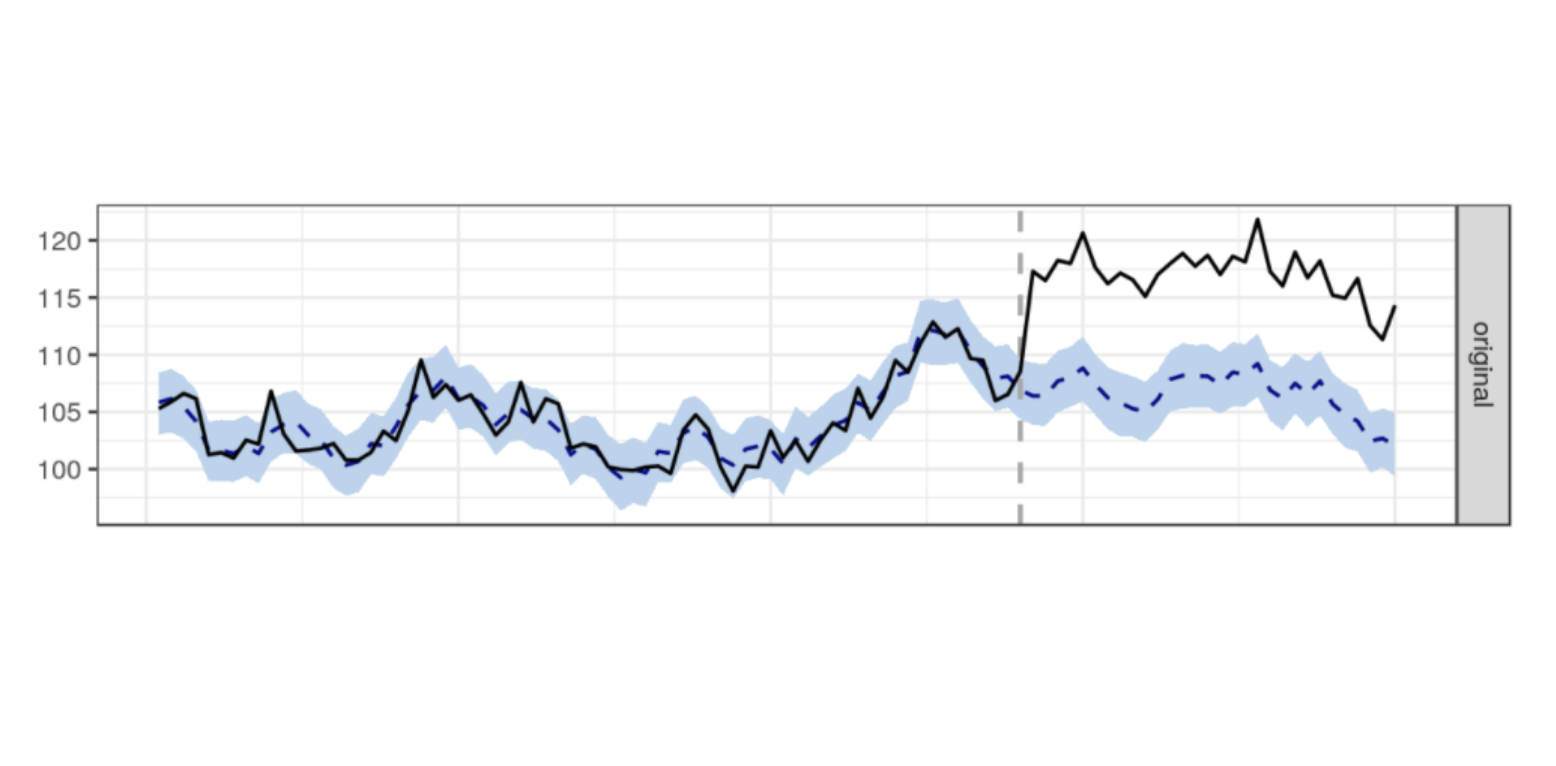
Simply, the mathematical model uses data prior to the event to predict what the data would look like had the event not happened. Important: the prediction is actually a probabilistic range of values. If the historic data is noisy, then the accuracy of the prediction will change. See the screenshot below from the demo walk through linked above. In the image below, the blue shaded area is the prediction (synthetic control estimator) from the model. If the observed data falls outside the blue region, we have significance!

Identifying Significance in Your Data


The blue region gets bigger with noisier data. The broader the blue region, the more extreme the observation will need to be in order to achieve a significant signal.


Using Google CausalImpact

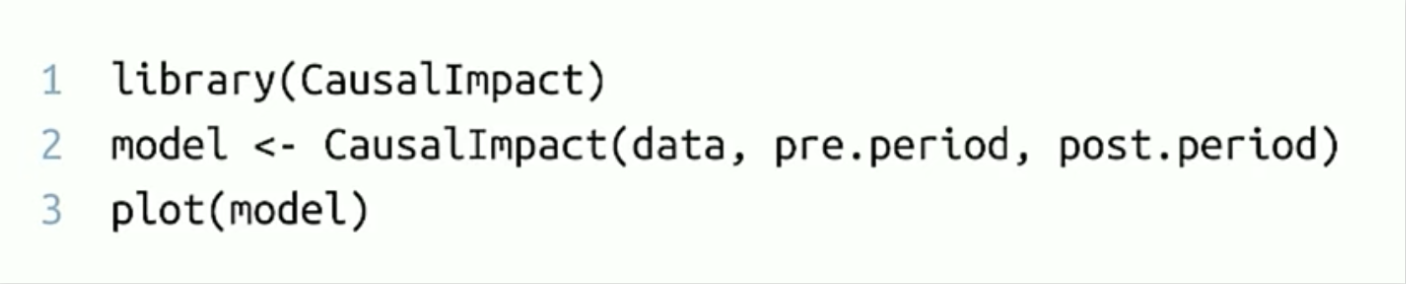
You can use the CausalImpact package with as little as three lines of R. R Studio is open source or you could try it out using rstudio.cloud.


CausalImpact Package


Be advised, if you install the CausalImpact package locally, due to dependencies, you'll need at least v3.5 of R. I updated Linux on the Chromebook to get the latest version of R and R Studio via this very useful article and the package installation was very straightforward.

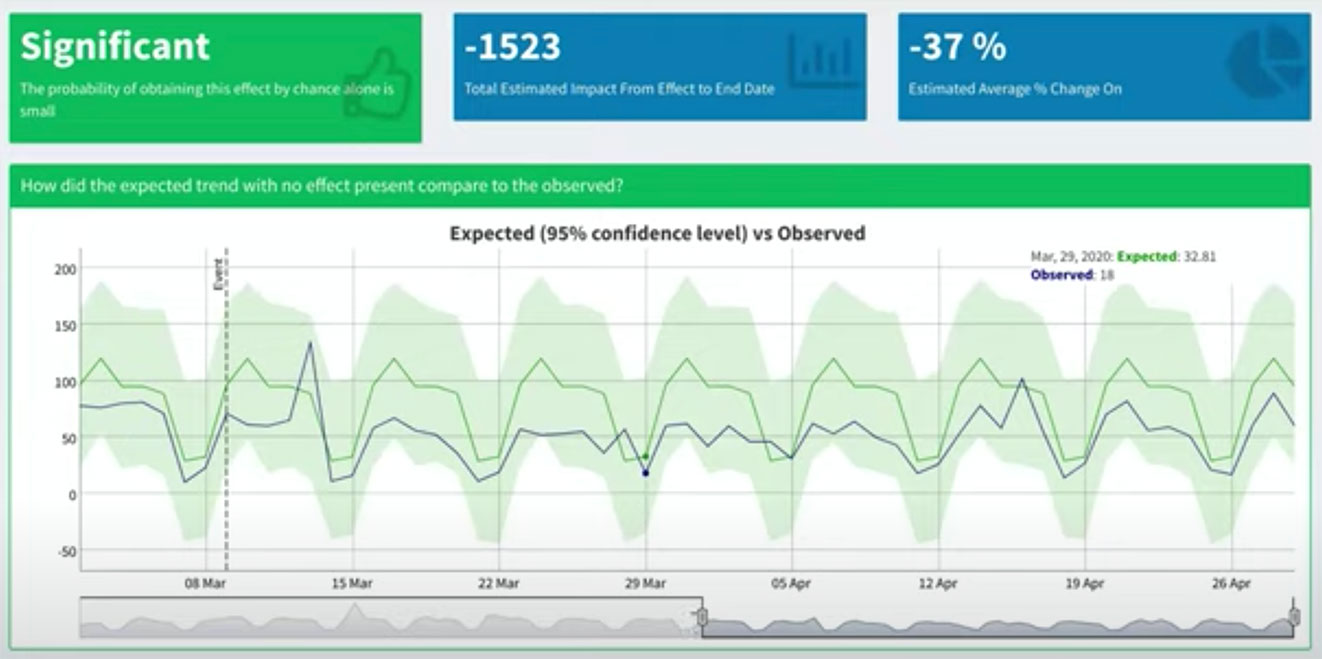
There's another option thanks to Mark Edmondson from IIH Nordic. Mark wrote a great Shiny app front end for CausalImpact that's free to use, so you can explore significance in your own GA data.


Using significance to establish causality and take action

We used the package to analyse client data to confidently answer key business questions that arose regarding KPI changes since the UK was locked down.

As well as considering YTD data (setting the 'event' as Jan 1), we use pre- and post-lockdown (Mar 9) date periods. Data shows clear patterns in purchase behaviour for retails sites. Media sites appear to exhibit explosive growth. However, the specifics regarding growth areas of content are highly informative—not what you'd expect to see by just eyeballing the data from afar.


CausalImpact Demo


For retail and media clients, the ability to identify current and future growth areas with confidence is a highly valuable tactic. At a strategic level, the forecast output from CausalImpact is highly actionable in driving campaign content, budgets, and timing.

While tactics for the current global situation include "managing," there is a clear near for preparation as well. Making decisions on current data and using forecasts with confidence proves to be valuable for our clients.


Additional Resources

Thank you for reading! The slides from the episode can be accessed here:


Watch the CausalImpact R package introductory video here (mandatory viewing!):

Making decisions on current data and using forecasts with confidence proves to be valuable for our clients. Learn how. data analytics data advocacy Google

Choose your language

Choose your language

The website has been translated to English with the help of Humans and AI

Dismiss