Choose your language

Choose your language

The website has been translated to English with the help of Humans and AI

Dismiss

McDonald's logo
A download now button in red with a cloud on it
A group of people enjoying hamburgers

Migration to Google Analytics 4 • Leveraging Predictive Audiences To Anticipate Outcome

  • Client

    McDonald’s Hong Kong

  • Solutions

    DataMeasurementConsumer Insights & ActivationTransformation & In-Housing

Results

  • 550% increase in In-App orders
  • 63% decrease in CPA
  • 230% stronger ROI
A young man on his phone sitting no the couch

Upsizing potential customer pools.

With the Covid-19 pandemic affecting foot traffic to quick service restaurants, McDonald’s Hong Kong sought to redesign its customer journey for the new normal. The brand identified new opportunities in mobile order in-store pick up, particularly through its McDonald’s app, and was eager to embrace the potential of its first-party data to grow app engagement and optimize the path to conversion. The brand partnered with Monks, who recommended turnkey machine learning solutions with GA4 to quickly gather customer insights, use them in predictive audience analytics, and target the audience segment with the highest impact.

A black line graph on a yellow background

In partnership with

  • McDonald’s Hong Kong
Client Words Google Analytics 4’s machine learning capabilities allow us to transform our digital advertising strategy efficiently and effectively by leveraging its out-of-the-box solution.
Kai Tsang headshot

Kai Tsang

Sr. Director Digital Customer Experience, McDonald’s Hong Kong

Satiating the appetite for accurate audience insights.

Using GA4’s machine learning capabilities, we analyzed a variety of behavioral insights: product impressions and clicks, cart activities and detailed views of engagement. With this data in hand, we created predictive audience segments and were even able to predict revenue from them. Linking the data to Google Ads allowed for deeper integration into the customer journey and enabled audience segments to further power app and web campaigns, helping the brand reach customers more effectively and drive in-app orders.

A hand holding a phone using the McDonald's app

Chart-topping results.

Through our guidance in implementing machine learning into the mix, not only did we help the client shorten months of data analysis work into a couple of weeks; the campaign also garnered very nice results in just two months. McDonald’s Hong Kong increased conversions by 550% and increased revenue by 560% for likely 7-day purchasers, as well as 230% stronger ROI overall. Using predictive segments, the learning phase of app campaigns became shorter, which helped reduce cost-per-acquisition by 63%. Finally, our team wrapped up the project with a workshop to enable the brand team to continue driving business results with GA4 capabilities.

Want to talk data? Get in touch.

Hey 👋

Please fill out the following quick questions so our team can get in touch with you.

Can’t get enough? Here is some related work for you!

Goodbye GA360, What We Should Know to Welcome GA4 (KR)

Goodbye GA360, What We Should Know to Welcome GA4 (KR)

1 min read
Profile picture for user Isabel Han

Written by
Isabel Han
Director of Analytics, Seoul

GA4 in big black block letter on a yellow background

전세계의 웹분석가들에게 사랑을 받았던 Google Analytics, 정확히 말하면 Universal Analytics 가 곧 그 시대를 마무리하고 새로운 세대의 Google Analytics, GA4라 불리는 새로운 분석 도구가 분석가들과 기업을 만날 준비를 하고 있다는 이야기를 들려드리고자 합니다.

GA360 Sunset 이란 무슨 의미인가

2년여 전, Google은 Universal Analytics(UA)를 대신하는 새로운 버전의 분석 도구를 시장에 내 놓을 것 이라는 로드맵을 발표했던 것이 엊그제 같은데, 드디어 한국시간으로 지난 3월 17일 새벽, 구글의 공식 블로그를 통해  2023년 7월 1일 부터는 공식적으로 무료 버전 UA의 Property에 새로운 데이터를 처리하지 않는다고 발표를 했습니다.  유료버전의 GA(GA360) 고객의 경우는 3개월이 연장된 10월1일 이후엔 이제 새로운 데이터를 수집할 수가 없게 됩니다. 

이 의미는 현재 GA를 사용하는 모든 기업과 개인은 2023년 7월 혹은 2023년 10월 이후를 준비해야하고, 경우에  따라서 어떤 기업 고객은 그 시간이 채 1년도 안남은 시간 동안 다음 세대의 GA 로 전환하는 준비를 해야한다는 의미입니다.  2022년 10월1일 부터 시작하는 라이선스까지는  GA360을 1년 더 사용하는 것이 가능하나,  당장 올해 11월부터 GA 라이선스를 Renew 하려고 계획하고 있는 고객부터는, GA360 대신 GA4 라이선스로 변경된 계약을 진행해야하는 상황이 되었습니다.  간단하게, 언제까지 GA360 을 사용할 수 있나 물으신다면, 현재 라이선스를 먼저 확인하고 Media.Monks의 담당자들에게 질의하시면 가장 빠른 답을 얻을 수 있습니다. 

GA4는 뭐가 다를까

많은 분들이 궁금해 합니다. GA4 는 그냥 버전 업그레이드 정도 아닌가? 뭐가 달라질까?

간단하게 웹분석의 기준으로 데이터를 보셨던 분석가들은 이제, 그 기준을 모바일 분석의 기준으로 데이터를 보아야 합니다. 즉, 데이터를 이해하는 패러다임이 달라집니다.   

Session이 아닌 Event - UA는 10여년 전 웹사이트에서 사용자의 행동을 추적하던 기술, Session 을 기반으로 추적을 했다면  GA4는 현대의 웹과 모바일을 저장소에 저장하고 추적할 수 있도록 event 를 기반으로 구조화 되어 있는 도구입니다.  이 의미는 하나의 데이터 저장소 안에  Web, iOS app, Android app의 데이터 스트림을 모두 담을 수 있게 되었으니 한 방문자가 여러 채널을 교차 방문하는 경우 그 분석이 가능해졌다는 큰 장점이 생겼습니다. 

유연한 리포팅  -  기존의 UA에는 이미 만들어진 여러 리포트가 있어서, 여러 방법으로 customize해서 사용을 했던 반면,  GA4는 사용자가 직접 Drag &Drop으로 리포트를 만들어서 활용할 수 있습니다. 그 대신 분석의 기준과 데이터의 기준에 대한 이해가 없는 사용자들은 어렵다고 느낄 수도 있게 됩니다. 따라서,  조직에서 데이터의 기준을 만들고, 데이터를 읽고 이해하는 방법을 소통하는 것이 더 많이 중요해십니다. 

Data-driven Attribution - Data-driven attribution은  각 전환 이벤트에 대한 데이터를 기반으로 전환에 대한 크레딧을 분배하는 기능으로, 고객 여정의 어느 클릭이 실제로 ROI에 기여했는지 분석하는 것이 가능해 집니다. 전환의 경로와 비전환 경로를 모두 평가하여 머신러닝에 기반한  배분 모델을 구현할 수 있게 되어, 과거 Last touch(마지막에 클릭을 했던 접점)가 모든 크레딧을 가져가도록 디자인 되었던 분배 방식으로 전환에 영향에 준 요인들을 대략 예상해 볼 수 밖에 없었던 마케터들은 이제, 데이터 기반 모델을 통해서  다양한 접점이 전환 결과에 어떻게 영향을 미치는지 이해할 수 있게 됩니다. 

그럼 UA Property에 있는 기존 데이터는 어떻게 되나? 

2024년부터는 Access 가 불가능해지므로, 늦어도 2023년 안에는 기존 데이터를 여러 방법으로 저장하는 현실적인 노력이 필요합니다. 예를 들면, 

  • 각 리포트를 여러 Format으로 export 하거나 (Manual) 
  • Google Reporting API로 export 하거나
  • 360 고객의 경우는 BigQuery로 export 하는 방법

그런데 GA360 고객의 경우 BigQuery로  exeport 한 경우라도, 그 데이터를 쉽게 비즈니스 사용자가 꺼내보기는 다소 어려울 수도 있으므로, 다양한 방법으로 Dashboard 등과 연결하여 GA4 만 사용하게 되는 순간이 와도, 과거의 데이터를 쉽게 access 하고 비즈니스의 연속성을 잃지 않도록 지금 부터 차근차근 준비하시길권유 드립니다.

준비되셨나요?

Media.Monks에서는 GA4 Adoption 프로그램이라는 이름으로, GA4 로 전환이라는 변화에 Soft landing 할 수 있는 많은 방안을 가지고, 서비스 및 컨설팅을 제공하고 있습니다. 더 상세한 정보 및 도움이 필요하시면 가까운 Seoul.Monks 들에게 연락주시기 바랍니다.

전세계의 웹분석가들에게 사랑을 받았던 Google Analytics, 정확히 말하면 Universal Analytics 가 곧 그 시대를 마무리하고 새로운 세대의 Google Analytics, GA4라 불리는 새로운 분석 도구가 분석가들과 기업을 만날 준비를 하고 있다는 이야기를 들려드리고자 합니다. Google data analytics

CJ Olive Young - Google Analytics 360 Implementation and Analysis (KR)

CJ Olive Young - Google Analytics 360 Implementation and Analysis (KR)

1 min read
Profile picture for user Dong-oh Kang

Written by
Dong-oh Kang
Senior Data Engagement Manager, Seoul

Black hexagons connecting from a thin white line

Team Members

Dong-oh Kang, Rebekah Kim, Sunyoung Kim, Jiyun Lee

Project Summary

CJ올리브영과 Media.Monks는 2021년 1월 시작해 약 5개월 간 데이터 수집 설계 및 구현 프로젝트를 진행하였습니다. 프로젝트를 완료한 시점부터 3개월 여 간 대시보드 구현 및 구매 단계 이탈요인(Fall-out), 온오프라인 고객 통합 데이터 행동 분석 프로젝트를 진행했습니다. 고객사 목소리에 따르면, 올리브영 내부에는 양사간의 협업 덕분에 데이터를 기반으로 한 의사결정 문화가 자리 잡았다는 평가를 받고있습니다. 또한 Media.Monks와 GA360 파트너십을 계속 유지하면서 앞으로도 양사 간의 시너지가 더욱 커질 것으로 기대되고 있습니다.

Project Object

올리브영은 국내 최대 규모의 커머스 플랫폼인 만큼 다양한 부서들이 협업하고 있습니다. 이에 따라 각 유관부서에서 필요한 데이터가 쌓일수 있도록 거버넌스 및 수집설계부터 필요한 상황이었고, 모든 구성원이 편리하게 데이터를 확인하기 위한 대시보드 제작도 필요했습니다. 또한 모든 유관부서 담당자들이 GA360을 제대로 쓸 수 있도록 이론 및 실습교육을 기획하고 실행하는 것도 하나의 목표였습니다.

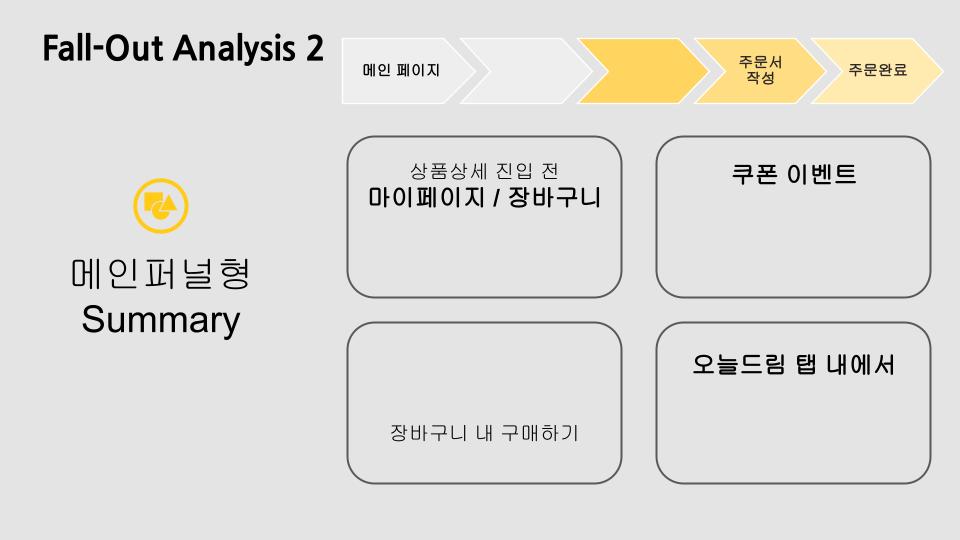
데이터 수집 프로젝트가 완료된 뒤에는 수집 된 데이터를 바탕으로 사이트 유입 사용자의 이탈요인 분석(Fall-out Analysis)과 전국의 1,200개가 넘는 오프라인 매장을 보유한 고객사의 특성에 맞게 On-Offline 데이터를 통합한 고객의 구매행동 특성을 분석하는 프로젝트를 함께 진행했습니다.

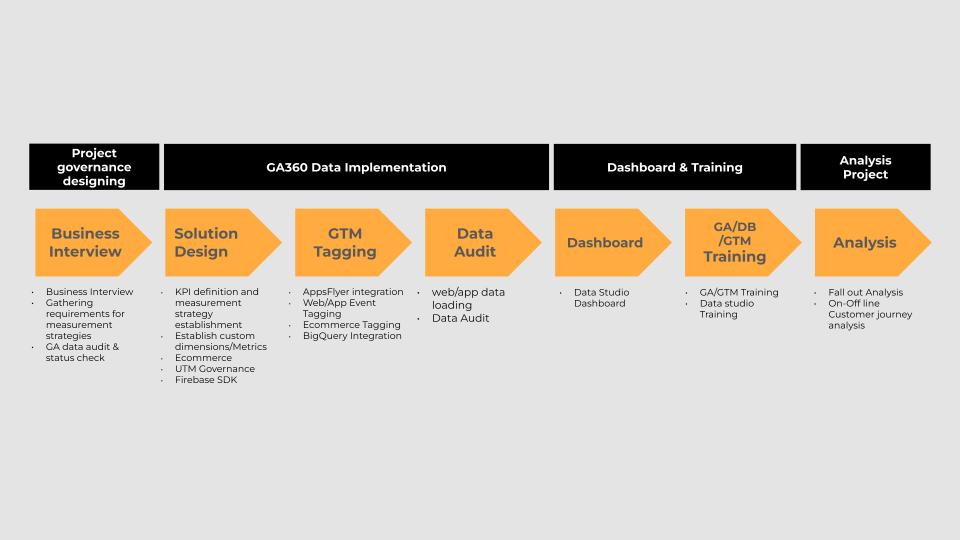
Project process from CJ Olive Young work

<올리브영 프로젝트 개요>

Project Detail

Data governance & Measurement design, GA 360 Data Implementation 

“GA360이라는 새로운 솔루션을 도입하고 내부 구성원들이 활용할 수 있도록 정착시키는 것이 쉽지않은 과정이었으나, Media.Monks와 함께였기에 성공적으로 완수할 수 있었습니다. 유관부서와의 인터뷰를 통해 보고싶은 데이터를 정의하는 단계에서부터 데이터 수집 방식 정의, 개발진행, 정합성검증, 분석과제 진행 단계까지 Media.Monks는 데이터 전문가로서 꼼꼼하게 계획을 수립하고 이행하며 과정 중 필요한 조언과 피드백을 아끼지 않았습니다.”

(허주연 대리, 플랫폼기획팀)

Media.Monks에서는 사전 설문 → 전 유관부서 비지니스 인터뷰 → 비지니스 요건의 구체화 및 측정 전략수립의 과정을 통해 올리브영 고객사에 가장 적합한 데이터 거버넌스와 측정전략을 수립하였고, GA360의 장점중 하나인 최대 200개까지 설정가능 한 맞춤측정기준과 항목을 최대한으로 활용해 첫 구매여부, 관심 매장 등 올리브영의 이커머스 플랫폼 환경을 모두 반영한 데이터가 수집될 수 있도록 설계할 수 있었습니다.

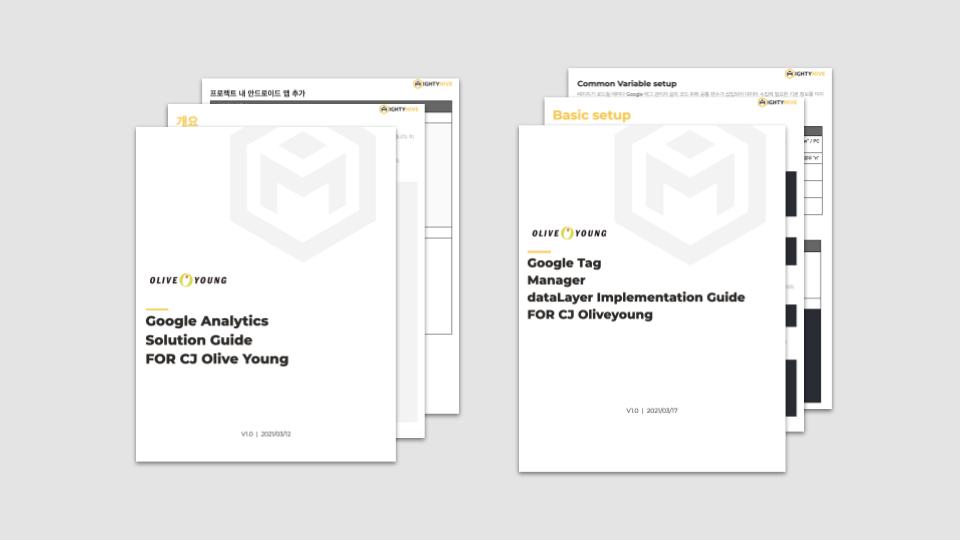
설계 이후 전 유관부서 들과 함께 설계한 내용을 공유하는 자리를 만들어 누락된 데이터가 없도록 최종적으로 설계를 마쳤고, 내부의 개발자들이 설계한 요건을 반영하여 개발에 적용할 수 있도록 Media.Monks의 솔루션 엔지니어가 개발 적용 전 과정에서 솔루션 디자인 문서 작성 및 적용 안내, 태깅, 확인 과정을 통해 데이터 수집 누락없이 프로젝트가 성공적으로 완료될 수 있었습니다.

Google analytics solution guide book from Media.Monks

<올리브영 솔루션 디자인>

Dashboard Design

“GA360 Implementation 프로젝트를 수행하면서, 대시보드를 통해 손쉽게 데이터에 접근하고, 자주 보는 데이터를 직관적으로 보여줄 수 있었습니다. 이에 따라 주로 데이터를 분석하는 팀이 아니더라도 전사에서 보다 쉽게 데이터를 매일 확인하고, 데이터 기반으로 업무하는 환경을 만들 수 있었습니다. Media.Monks와 구축한 GA360과 대시보드 사용을 시작으로 회사의 업무하는 방식에 대한 변화 이루어질 수 있었습니다.”

(홍민애 과장, 플랫폼기획팀)

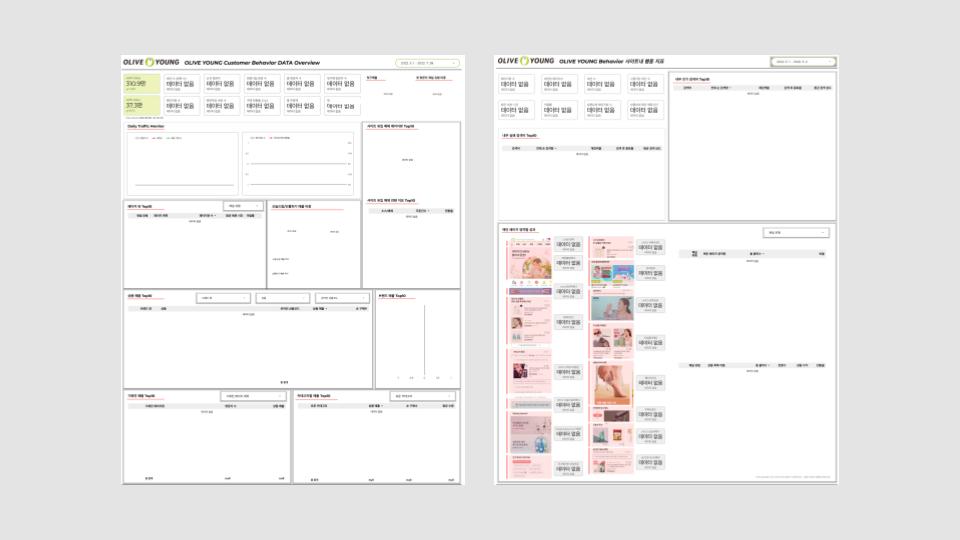
올리브영이 GA360 도입을 통해 이루고자 했던 목표는 데이터 기반의 업무 수행 문화가 회사 내 정착되는 것입니다. 이를 위해서는 누구나 고객행동 데이터에 손쉽게 접근하고 활용할 수 있는 환경이 조성되는 것이 필요합니다. Media.Monks는 항시 모니터링하는 사이트 유입 및 중요 행동지표들의 데이터 시각화 구현을 위해 테이블 필터 및 데이터 블랜딩 설계 등이 포함된 데이터 스튜디오 디자인을 수행했습니다. 이를 통해 구글 애널리틱스로 수집되는 데이터를 고객사 내부의 누구나 손쉽게 확인하고 공유될 수 있도록 했습니다.

Dashboard design

<올리브영 대시보드 디자인>

Analysis Project

“Fall-Out 분석을 통해 우리 고객의 실제 이동경로를 볼 수 있어서 좋았습니다. 이를 통해 고객에게 의미있는 서비스 페이지를 발견할 수 있었고, 이 페이지를 바탕으로 고객들의 구매전환에 더 도움이 될 기능들을 기획하게 되었습니다. 또한, 고객의 이탈요인이 명확하게 보임으로서, 간단한 UX 수정으로 고객의 구매전환을 상승시킬 수 있어 즉각적인 효과를 볼 수 있었습니다.” 

(임수진 사업부장, 디지털프로덕트사업부)

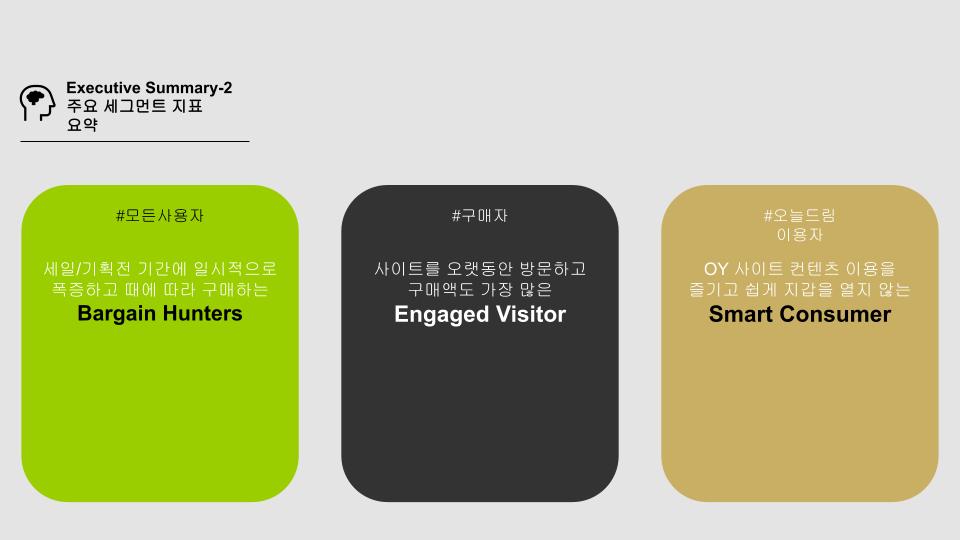
GA360에서 원하는 요건의 데이터가 수집되면서, 올리브영에서는 가설 수립 위주로 기획해 오던 온라인몰에서의 고객 구매여정을 데이터로 확인하고 구매 전 단계에서의 이탈요인을 분석 및 UX 개선 필요사항들을 도출하고자 했습니다. 이에 따라 Media.Monks에서는 Fall-Out 분석을 제안하였고, 분석 설계와 데이터 추출 및 보고서 작성 업무를 성공적으로 수행했습니다. 이를 통해 구매자의 주요 행동 특징을 파악할 수 있었고 퍼널 유형별 이탈 요인 및 개선 포인트를 도출 할 수 있었습니다.

Executive summary from project
Fall-out analysis from the project

<올리브영 Fall-Out 분석>

“올리브영과 같이 오프라인과 온라인 채널을 모두 보유한 회사의 경우, 지금까지는 온라인과 더불어 오프라인 고객들의 행동분석에 대한 갈증을 해소하기는 어려웠습니다. Media.Monks에서는 쉽지 않았음에도 새로운 분석방향을 제시해주시면서 올리브영이 원하는 온라인과 오프라인 고객 데이터가 연결된 옴니채널 고객 행동을 분석할 수 있도록 많은 도움을 주셨고, 함께 고객데이터를 분석하면서 의미있고 실행가능한 인사이트를 도출해주셨습니다.”

(강승범 팀장, 유저그로스팀)

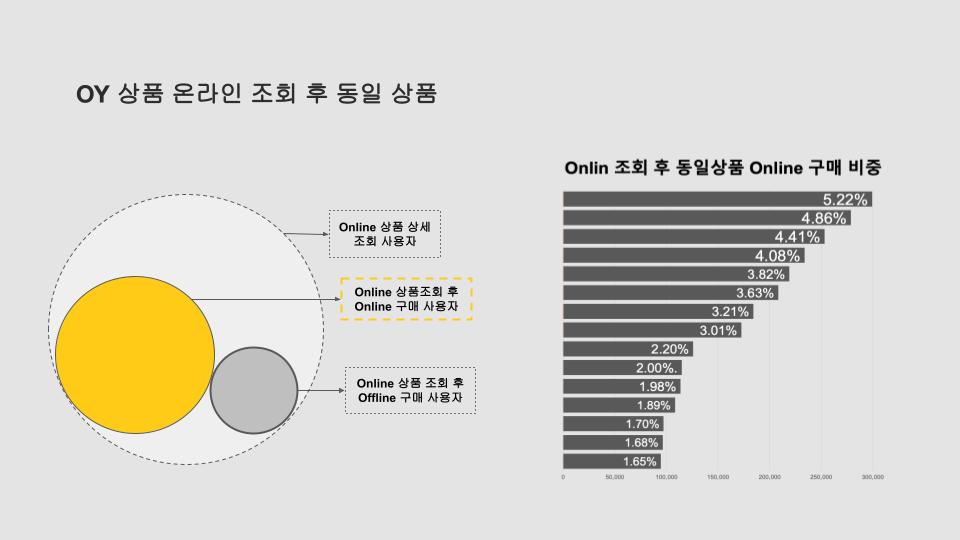
올리브영과 다른 온라인 플랫폼들간의 가장 큰 차이는 전국에 오프라인 매장을 보유하고 있다는 것입니다. Media.Monks와 올리브영은 매장내 고객들의 암호화된 데이터를 구글 클라우드 서비스를 통해 Bigquery에서 온라인 고객 정보와 매칭하여 고객의 On-Offline 통합 행동분석을 진행했습니다. 이를 통해 온-오프라인 플랫폼에서 동시 구매하는 고객과 일반 구매자와의 행동 특성의 차이점과 온라인 구매와 오프라인 구매 행동의 차이등을 분석하여 통합적인 마케팅을 전개할 수 있는 기초 자료를 보유할 수 있게 됐습니다.

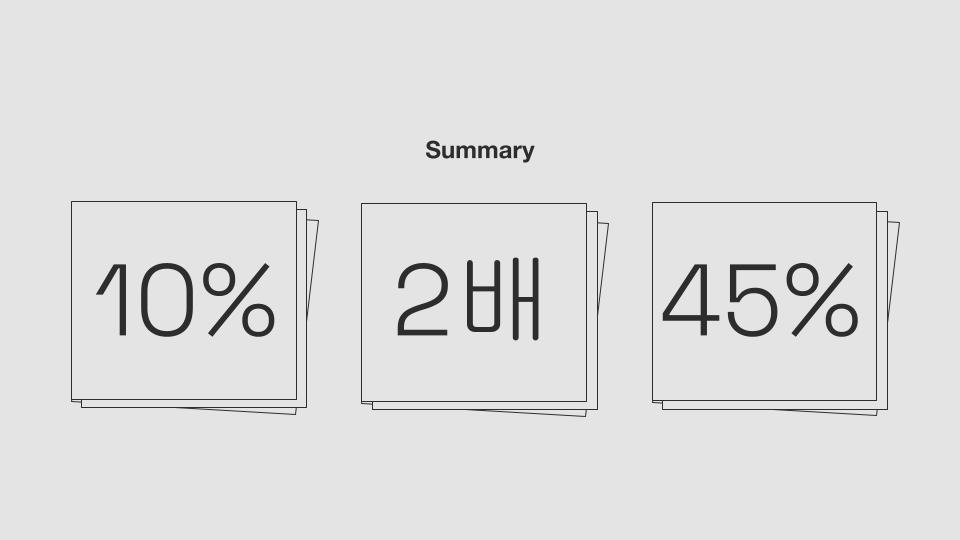
Summary outcomes from the projects

<올리브영 옴니채널 고객 행동 분석>

CJ올리브영 프로젝트는 2021년 1월 시작해 약 5개월 간 데이터 수집을 위한 거버넌스을 수립하는 구현프로젝트를 진행하였습니다. 설계 및 수집 프로젝트가 완료한 시점부터 3개월 여 간 대시보드 구현 및 구매 단계 이탈요인(Fall-out), 온오프라인 고객 통합 데이터 행동 분석 프로젝트를 진행했습니다. Google data analytics

Data

Leverage data to transform customer interactions into strategic insights.

  • 1P Data We've
    Harmonized

    1,200+ TB

  • Global
    Headcount

    250

Employees standing over a table working together
People on a beach with different fragments of photos surrounding them
employees chatting at a desk overlooking a laptop

Create end-to-end, data-driven, personalized customer experiences.

Data is the single common thread that allows brands to connect the customer experience, making it a key differentiating asset for brands to master. Therefore, turning data into a consistently productive resource is perhaps the most critical question facing marketers today. We work toward that goal by empowering marketing organizations to wield data as a strategic asset that drives meaningful connections and data-driven customer experiences.

Tailored solutions, from groundwork to liftoff.

We partner with brands to build a strong data foundation, drive deeper connections and accelerate top line growth. First, we help them take control of their tech strategy, platforms and data. Next, we break down silos between departments, regions and vendors to blend data into a single source of truth. After translating that data into meaningful insights, we then plan, activate, personalize, test and optimize to yield tangible, measurable results.


Supporting last-mile activation.

  1. Work

    Mondelēz Data and Measurement • We helped Mondelēz build a correlation between digital advertising and sales, increasing return on global media investment.

  2. A cookie and brownie mountain

    Mondelēz set out with the goal to create better consumer connections through data. Fragmented technology, lack of data governance standards and the lack of a single source of truth stood in the way of making this possible.

  3. Mondelez logo within a purple teardrop shape
    A person holding Mondelez snacks in arm
  4. Media.Monks defined and implemented best practices across technology infrastructure and data standards. This foundation unlocked last-mile activation capabilities, enabling Mondelēz to transform measurement and drive  +10% return on media investment globally.

  5. Want to learn more about our partnership with Mondelēz? Check out our full case study.

Swipe
For More!

Drag
For More!

`

Connect

How can we help you innovate? Drop us a line.

Solutions

We are here to help with...

Highlighted

Solutions

Swipe
For More!

Leveraging AI to boost customer lifetime value

image starbucks girl
A table outside with all sorts of Starbucks coffe cups on it. At the back of the table you see two hands of a person who is using his mobile.
Starbucks

Case Study

AI Customer Voice AnalysisLearn how we helped Starbucks understand their consumers’ behavior through AI-driven insights.

See Full Case Study

Our practice and approach.

We’re not here to add to your tech debt. The consumer mindset has changed and we are adapting with that change. We build durable, scalable solutions that meet the needs of complex enterprises to advance your data maturity and drive top line and bottom line impact to your business.

We’ve helped clients better understand and connect with their customers by:

Results

  • Transforming digital ad measurement, connecting online and offline sales
  • Implementing privacy-first site tagging
  • Streamlining cross-network campaign optimization
  • Building customized, business intelligence solutions to surface audience and campaign insights
  • Automating audience generation, campaign trafficking and tagging
Monk Thoughts Data not only serves as the ideal foundation for AI & agentic innovation, but is the key last mile of enhancing media effectiveness and optimizing every part of the marketing stack.
Chris Wilhelmi headshot

Want to talk data? Get in touch.

Hey👋

Please fill out the following quick questions so our team can get in touch with you.

On our minds

What to Expect with the New Search Ads 360

What to Expect with the New Search Ads 360

4 min read
Profile picture for user Jimmy Le

Written by
Jimmy Le
AUNZ Search Lead, Media.Monks APAC

A hand drawn journey with emojis and scribble designs

In early February, Google announced the launch of the new Search Ads 360 (SA360) experience with major changes to be rolled out to their leading search management platform throughout 2022. The planned updates will include a redesigned UI, improved search engine support and advanced enterprise innovation.

As someone who has spent countless hours switching back and forth between the previous SA360 and the Google Ads’ UI, the new experience is a long time coming. The updates will offer SA360 advertisers an efficient workflow and stronger cross-engine compatibility, all within a single search management platform. Below is an in-depth look at what to look forward to as SA360 rolls out in 2022.

Greater Workflow Efficiencies

Google has shaped the new SA360 experience around achieving greater workflow efficiencies by implementing updates designed to minimize unnecessary repetitive tasks. One of the updates that I’m most excited about is the new and improved cross-platform support of the Google Ads Labels feature. Advertisers will no longer be required to recreate and reapply the same labels, as any labels linked to Google Ads will automatically become available in the new SA360 interface. This was one of the most requested features amongst my colleagues and clients, so it’s great that it’s finally here. The previous requirement of recreating and reapplying labels in SA360 through manual operations, such as bulk edits and excel uploads, will now be a thing of the past! 

There are more avenues to scale with centralization through enhanced cross-advertiser management. With the previous SA360, customizing reporting views or campaign management done at the “Advertiser” platform level has always operated individually. The new SA360 experience will address this by granting the ability to report and manage campaign activities across multiple Advertisers at once. Noticeable workflow improvements include the option to create custom columns (previously called formula columns) at the Manager (previously “Agency”) level, to execute bulk changes to multiple accounts simultaneously and to duplicate entities across engines or the Advertiser level with a new copy and paste function.

These new SA360 updates drive greater productivity for advertisers with many search engine accounts and agencies who would like to organize client reporting tasks simultaneously. 

Above: The new Search Ads 360 user interface (Source: Google Blog - Introducing the new Search Ads 360)

A Familiar UI with Upgraded Navigation

Google has intentionally made the new SA360 look and feel more like the current Google Ads interface. Users that are already experienced in Google Ads will see immediate benefits and feel right at home with the new SA360. This is also useful for training and adoption, as any familiarity of the Google Ads UI navigation and workflow processes will translate over to the new SA360 (or vice versa) for one consistent experience and quicker adoption. It’s also an added bonus that Microsoft Ads has a very similar interface!

Vastly Improved Search Engine Support

The new SA360 and Google Ads now share core common technology powering the functionality and capabilities of both platforms, resulting in the ability to manage and process more data than ever, all while maintaining a fast user experience. This also means that previously unsupported features within SA360 will soon become available in the new version. Google has also confirmed the support for campaign types including Performance Max, Discovery Ads and Local Inventory Ads. 

To add to this, upgraded engine feature support such as extensions, audiences and creative formats for alternatives to Google (i.e. Microsoft RSA, DSA & smart shopping) will also be included in the upcoming updates. This improved support will allow advertisers to complete much more of their day-to-day workflow from within a single search marketing platform. Advertisers that are currently using SA360 to manage standard paid search campaigns and Google Ads to manage Performance Max or Discovery campaigns should be celebrating right now, as the management and reporting of all three campaign types can be done under the new SA360! This will also make it easier for dashboard reporting (i.e. third-party data or Data Studio) as users can include a single data source.


Updated Google Analytics Integration and Support for GA4

In the new SA360 experience, Google continues to develop SA360’s native integration with other GMP products, in particular with Google Analytics (GA4) properties. The new SA360-GA4 integration enables the import of GA4’s web and in-app event metrics into the SA360 reporting UI, allowing for additional measurement and optimization into how search activities are performing against web or in-app based events. Additionally, if Google Analytics Goals are your reporting and measurement source of truth, web or in-app-based GA4 Goals are available to use as a conversion source for performance automation and optimization—a handy alternative to Google Ads conversion tracking or floodlight tracking tags.

Bridging the Gap Between Platforms

When onboarding and training new clients in the previous SA360, one of the most frequently asked questions is: “Should we migrate our day-to-day workflow from Google Ads to SA360?”

I’ve always recommended that teams combine Google Ads campaign management workflows with SA360 performance optimization workflows (as opposed to using only one or the other) to get the most value out of both platforms. There will still be some instances that require switching between both. However, with the launch of the new experience, we’re seeing a big step with the new SA360 in the right direction in bridging the gap and enabling teams to use one interface for most tasks.


With the enterprise advantages of using a search management platform for engine consolidation, management, reporting and automation, we’re very excited for the streamlined and efficient workflows when transitioning search engine accounts’ daily tasks over to the new SA360 experience—and search marketers will be, too.

Get an in-depth look at what to look forward to as Google’s Search Ads 360 (SA360) rolls out in 2022. Get an in-depth look at what to look forward to as Google’s Search Ads 360 (SA360) rolls out in 2022. Google data analytics data driven

How to Prepare Now for the GA360 Sunset

How to Prepare Now for the GA360 Sunset

2 min read
Profile picture for user doug_hall

Written by
Doug Hall
VP of Data Services and Technology

Employees sitting around a laptop discussing work

Today Google announced an official date for the sunset of Google Analytics 360 (GA360), and the product known as Universal Analytics (UA) will be formally replaced by Google Analytics 4 (GA4) in 2023. Here is what you need to know, what you need to do and how Media.Monks can support you.

What will happen and when?

The free version of Universal Analytics will become read-only on July 1, 2023. The GA360 version of UA will become read-only on October 1, 2023.

For those on GA360, you will have at least six months after signing a Google Analytics 4 contract before your UA property is downgraded. 

What do you need to do?

They say the best time to plant a tree was 100 years ago…and the second-best time to plant a tree is now. Those who started the GA4 journey early will be in good shape, ready to have year-on-year comparison data. 

If you haven’t started your GA4 journey, start now. A realistic deadline to work towards is October 2022, which gives you 12 months of GA4 data for comparison purposes. Start with a Minimum Viable Product, which is a simple way to start swimming in GA4 waters. It takes 30 minutes to set up, involves just one tag, and yields a surprising amount of data. It also has no impact on GA360 billing and no impact on current data collection.    

When you’re ready, Media.monks is here to help support your migration. Media.Monks offers a wide array of analytics services and training so every one of our clients receives the consultation they need for a first class, end-to-end analytics roadmap and a seamless transition.

Google’s sunset of Google Analytics 360, and the product known as Universal Analytics (UA) will be formally replaced by Google Analytics 4 in 2023. Here is what you need to know. Google’s sunset of Google Analytics 360, and the product known as Universal Analytics (UA) will be formally replaced by Google Analytics 4 in 2023. Here is what you need to know. Google data analytics

Can Topics Enable Personalization at Scale?

Can Topics Enable Personalization at Scale?

4 min read
Profile picture for user Benjamin Combe

Written by
Benjamin Combe
Senior Manager, Analytics and Optimization

two images of people: on the left, a woman looking at her phone. On the right, the same woman smelling perfume at a store

Google have recently announced their newest proposed mechanism for enabling interest-based advertising following the phasing out of third-party cookies, called Topics. Topics replaces Google’s previous proposal, Federated Learning of Cohorts (FLoC), and aims to improve on that proposed solution based on stakeholder feedback.

With Topics, Chrome determines several thematic interests, like “Fitness” or “Travel,” based on a user’s recent browsing history. Topics are calculated and stored entirely on a user’s device without communicating with Google’s servers. They are designed to be transparent and viewable by the user, as well as easily interpreted by potential advertisers via a JavaScript API. This makes Topics a future-proofed solution for simply and clearly providing user’s browsing interests for site owners and advertisers, without exposing detailed browsing history or cookie-based identifiers.

While Topics are aimed primarily at enabling advertisers, it could help with better onsite actions using tools like Google Optimize, Adobe Target, Optimizely, or other onsite testing and personalization platforms.

Brands Need to Look Beyond the Third-Party Cookie

Currently, most optimization or personalization tools cannot be used directly to customize onsite content based on interests. If they can, they are reliant on data management platforms (DMPs) and other brittle solutions that continue to require soon-to-be-deprecated third-party cookies. 

For example, Google Optimize cannot be used directly based on interest or affinity information inferred from third-party cookies. Instead, interest data provided by users who consented to third-party cookie tracking is currently available in Google Analytics for reporting and analysis purposes. 

Since this data is not available for use in audiences shared with Google Optimize, one is unable to target or personalize onsite experiences based on it. Alternatively, while Adobe Target may be able to access this data through API integrations with DMPs, it is also dependent on soon-to-be deprecated third-party cookies, making the data integration moot.

Chrome’s implementation of the Topics API meanwhile presents a ripe opportunity for personalization tools to leverage user interests, agnostic of the third-party ecosystem. In particular, a user’s interest topics will be stored entirely on the browser and accessible via API, meaning that they can be surfaced to a website or other API caller without reference to an opaque third-party cookie. 

This change enables accessibility of users’ Topics directly within the browser, rather than having to be processed on Google’s servers—meaning that a tool like Google Optimize will be able to query and read a user’s Topics in real time when they land on a website, leading to better onsite personalization in a first party context on the browser.

How Topics Can Enable Post-Cookie Targeting

Imagine a user visits our site www.ecommerce.com. As they land on the site, a query to the Topics API returns a relevant interest for that user is “Fitness.” We can surface that topic to an optimization/personalization platform (e.g. Optimize or Target) for targeting, resulting in the optimization platform changing the homepage banner to direct that user to our Fitness product category. 

In this way, Topics and a personalization engine could be used to:

  • Update landing page copy and imagery to be more relevant
  • Personalize a homepage banner to hero relevant product categories
  • Feature content or articles more relevant to a user’s interests 
  • Feed personalized recommendations to users

Pending the exact specifications of how Topics are eventually rolled out, even more advanced use cases may be made possible via storing and linking a user’s topics with a first-party identifier. A first party identifier could be cookie based for anonymous users (e.g. a cookie ID like Google’s client ID), or an identifier linked to a known/authenticated user (e.g. a customer ID, a hashed email address etc). In the above example, it may be possible for the user’s “Fitness” topic to be tracked against their first party identifier in an Analytics tool (e.g. stored alongside a customer ID in Google Analytics). 

Once associated with a user’s first-party Universally Unique ID (UUID), this topic could then be integrated with CRM data and used to power relevant marketing automation emails. The topic could also be used to generate more relevant retargeting audiences (e.g. via customer match) or be used to power dynamic creative. Personalization to that level now seems like a hygiene factor with a recent McKinsey report sharing how 71% of customers  expect at least a basic level of personalization. However, a fine line needs to be maintained in how data informs the creative process rather than dominates it. 

Prepare for Cookie Deprecation Now

Topics are still a very new proposal from Google that has been released in order to prompt discussion and feedback, meaning that the actual Topics API has not been thoroughly tested by partners and stakeholders yet. While we can speculate on use cases and possible applications to personalization, all of the above will have to be tested thoroughly as the Topics API is rolled out by Google. 

While we await more detail and further evolution of the Topics API proposal, businesses can partially execute on these use cases by deploying a platform to test and personalize on their website, as well as targeting affinity/interest audiences either via media targeting or profiles available via data management platforms. This would mean a proactive approach to adapt to the eventual deprecation of third-party cookies. Topics may represent a way forward for providing more relevant customer experiences (both onsite and advertising) in a more robust, privacy-centric way.

While Google’s Topics are aimed primarily at enabling advertisers, it could help with better onsite actions using tools or testing and personalization platforms. While Google’s Topics are aimed primarily at enabling advertisers, it could help with better onsite actions using tools or testing and personalization platforms. personalization digital platforms Google third-party cookies

How to Lower Cost Per Click

How to Lower Cost Per Click

3 min read
Profile picture for user mediamonks

Written by
Monks

A blue phone showing a search bar

Ever wonder the secrets to lower your cost per click while maintaining favorable results? This guide will walk you through exactly how cost per click is calculated through real-time auctions and how you can get the best rate. In addition, we’ll cover how cost per click has changed over time, which platforms are more expensive than others, and why.

How is cost per click calculated?

The amount you spend for a digital click is broadly determined by four factors:

  • Competition: more advertisers mean you are directly competing with more bidders in the auction.
  • Quality Score: taking into account the quality of your ad and how relevant your ad message and landing page is to the search query.
  • Bidding strategy: your maximum bid you are willing to spend per click or impression.
  • Seasonality: when you advertise also has an impact on your cost per click. For example, if Black Friday is a popular time for competitors bidding, this will mean you are competing with more advertisers in the auction.

In Google Ads, you specify your maximum bid for keywords or phrases, then Google evaluates your ad to determine its quality score. Your quality score and maximum bid together make your Ad Rank. Google will use this Ad Rank to compare you to other advertisers. This is important so that only relevant and good quality ads are shown at the top of search results, a benefit to both the user and the advertiser.

Google then works backwards to answer the question: what is the bid the advertiser with the highest Ad Rank needs to win the auction? This is where the formula above comes from. The highest you will ever pay is your maximum bid, though advertisers can still win the auction with the lowest maximum bid by having the highest relevance.

How has cost per click changed over the years?

“Cost Inflation” is a term often sprouted by digital marketers as they worry about the increasing costs of running paid advertisements across platforms such as Google and Facebook. Whether that be pay-per-click search campaigns, image-based shopping ads or display campaigns on social media and popular blog sites, we are seeing a very similar trend: it is becoming more expensive to advertise. 

A study by Hochman Consultants looks at the average cost per clicks across 50 advertisers on the Google AdWords Network from 2005 to 2019, where the advertisers came from a range of industries. We can see that cost per click has been growing steadily over time, and in 14 years, the average cost per click is almost triple that of 2005. This study was conducted in the US, but we are seeing a similar trend across advertisers in the UK.

Like any competitive market, pricing is determined by supply and demand. When Google Ads first launched in 2000, there were 18 million searches per day worldwide. In 2019, there are around 5.6 billion searches a day worldwide—the equivalence of 63,000 searches every second. Not only is that 300x the search volume of when Google Ads first began; with growing capabilities of targeting, you are really able to whittle down which search queries you want to bid for based on location and for which demographic you want your ad to shown to. Also, the number of advertisers in digital marketing platforms are increasing, and spend for UK Paid Search media surpassed that of TV in 2015 becoming the most spent channel. 

How does cost per click differ across social media channels?

Facebook and Twitter are the cheapest to advertise in, with Instagram being double the cost. This is mainly due to a different ad format mix, where Instagram ads are more likely to be videos. LinkedIn is by far the most expensive to advertise in, as they offer a very niche audience of professionals, with filtering options to target job title, years of experience and company name for example.  

How can I lower my cost per click?

As mentioned earlier, cost per click factors in the quality of your ad in the Quality Score metric. In the example above, the advertiser willing to spend the least actually won the auction due to having a high-quality score. So how can you improve your quality score and therefore lower your cost per click?

  • For Google Ads, ensure your ad is relevant to the keyword you are bidding for. If you are bidding for “hand sanitizer” but you really sell washing powder, you may need to rethink your keyword strategy.
  • Make sure that your landing page is relevant for the ad. For example, a landing page with 100 different items to shop from including hand sanitizer wouldn’t work as well as a landing page that is only about hand sanitizer, because Google will deem the latter more relevant
  • Optimize for click-through-rate. This is often the case with social media advertisement as well as Google Ads. Having a clear call-to-action and a good creative will help.

The final note is that historic performance of your account is taken into consideration when calculating cost per clicks, so take the time to make sure all ads are optimized as much as possible. With the info above, you should be well prepared to optimize toward success. Learn more about how we can help you now.

Find out how your cost per click is being calculated and how to lower it. Learn which platforms are more expensive than others, and why. Google media strategy data analytics

Dual Tagging Gotchas: Data Models & Mapping for GA4

Dual Tagging Gotchas: Data Models & Mapping for GA4

4 min read
Profile picture for user Brianna Mersey

Written by
Brianna Mersey
Director of Data, NAMER

Yellow background with words saying Make Yourself at Home on GA4

Universal Analytics (UA), a measurement platform dear to my heart, has served us well since 2012. But with the advancement and ubiquity of apps, the platform had to be re-imagined. Now, omnichannel marketers’ every wish has been granted with the launch of Google Analytics 4 (GA4 or  New GA), the next generation of Google Analytics that measures web and app data together.

Previously, you’d have to turn to separate platforms to measure different types of data: Universal Analytics is focused on web analytics, while Firebase—the app development platform Google acquired in 2014—focused on apps and offered less robust reporting. What made working with both platforms challenging is that their data structures are altogether different (think Adobe Analytics vs Google Analytics), with variables and metrics that just don't line up.

Now joining web and app data together, GA4 is here to stay—and it’s time you began thinking ahead on how to implement it into your existing solutions. There’s no question as to whether you should migrate from UA to GA4; if you don’t set up GA4 now, you’ll lose the chance to collect that historical data. 

And while there are many new features and benefits to GA4, there’s one place in particular I recommend you begin with: dual tagging. Dual tagging means deploying GA4 parallel to your existing UA tags. Let’s run through some important points you should know as you get started integrating GA4 into your setup.

Start Out with Event Mapping

Most importantly, be aware that the current UA data model is built on sessions, whereas the new GA4 data model is built on events. That means to migrate your data from UA to GA4, you’re going to want to create an updated measurement plan which details the mapping of all important variables.

Examples of user maps for GA4

Essentially, all our trusted UA events will be mapped to GA4 events and event parameters. And all the legacy hit types like social, page view, transaction fall under an “event” in GA4. This makes the tracking more robust and allows you to report on all types of legacy data points in one report, because now they are all events.

A map showing different measurement properties

Another point worth discussing is the death of the event category, action and label. Those are dead to you, adios amigos! Instead, your original event action now becomes the name of your event, while the event category and event label become parameters if you so choose (or not, if you’re using gtag.js).  

Left unattended, this could lead to a colossal data scramble, depending on your event action values, ie: “click.” In my experience with Dual Tagging, I often merge the event action and category as my event name and the event label slots into an event parameter with a more descriptive value than “event_label.” The GA4 events represent one action, so it can be more granular than the historical UA event, which at times encapsulates a range of actions. I’d recommend working with a partner like Media.Monks to discuss your measurement plan before your march ahead. Now is a great time to reset your data strategy and clean up your reporting. Write off the technical debt; you can’t break a dashboard that doesn’t exist. 

If you’re using gtag.js, note that once you implement GA4, your GTag code is automatically mapped to GA4, like this:

GA4 events in UA property

Setting Custom Dimensions

With that in mind, let’s dig a little deeper and take a look at our UA Custom Dimensions. You won't see “session” scope listed when you map custom dimensions—that scope does not currently exist. If you want to track user attributes, also called User Properties, they should be mapped to “Custom Dimensions, user scope.” And don’t get User Properties confused with Account Properties, which are two totally different things. (The naming could have been better on that one!)

GA4 custom dimensions setup

There is also one new step in GA4: you have to map your custom dimensions in the GA4 UI.  Otherwise you won’t see the data in your reports.

GA4 custom dimensions setup

Change Your Perception on Sessions

I also wanted to let you know that sessions themselves are now counted differently. A UTM parameter change won't start a new session! Nor will a late-night session that crosses over midnight. Sessions in GA4 are restarted only after 30 minutes of inactivity, just like in Universal Analytics. That means your session counts are going to be lower in GA4 if you try to compare reports directly to UA (don’t do that!).

Setting up Dual Tagging is a must, right now. Don’t delay in enabling that GA4 property.  It can all be done via the GA interface, and you can have pageviews and five other events firing out of the box (like scroll, downloads, exit links, internal search and YouTube interactions)! 

However, take your finger off the trigger before setting up your custom event tracking. We do not recommend directly mapping UA to GA4. You will need to carefully think through a new measurement plan, as mentioned above. It doesn’t mean you will start from scratch (although if you’ve wanted to do that, now is the perfect opportunity). There are a set of recommended events Google encourages you to use because future reporting and features will be based on them; for example, account signup is “sign_up.” If you don’t take time to think through how the data will appear in your reporting, along with the mapping and your variable quotas for the standard GA4, you could seriously regret your haste come six months.

Pyramid of measurement hierarchy

The variable quota can be found in your GA4 dashboard if you can’t remember how many you’ve created:

GA quota information interface

And that’s it—you’ve taken your first steps in getting acquainted with GA4. Again, the suite solves the crucial challenge of aligning your web and app measurements, fueling insights everywhere your audience turns within your owned platforms. Setting up GA4 sooner rather than later will help you future proof and collect greater historical data, so don’t wait—but if you need some help, you know who to call!

Google Analytics 4 is helping brands join their data from across platforms. Learn how to get set up with the tool using dual tagging. Google Analytics 4 is helping brands join their data from across platforms. Learn how to get set up with the tool using dual tagging. data data analytics Google

Inspiring Audiences Through Out-of-this-World Original Content

Inspiring Audiences Through Out-of-this-World Original Content

3 min read
Profile picture for user mediamonks

Written by
Monks

Inspiring Audiences Through Out-of-this-World Original Content

A new series of film shorts produced by Media.Monks ensures you don’t have to be a rocket scientist to understand the daily activities of the Frontier Development Lab. The lab (a partnership between NASA and the European Space Agency and hosted by the SETI Institute) must make sense of enormous amounts of data each day to tackle some of earth’s greatest challenges at greater speed and efficiency than ever before.

Backed by decades of research, scientists can predict solar flares, identify probable flood zones and search for natural resources on the moon. Powered by technology from Google Cloud and Intel, they can achieve even more, faster. The shorts offer an over-the-shoulder (and digestible) look at how FDL research affects our everyday lives, turning invisible technology that functions behind-the-scenes into tangible outcomes.

Through the films, viewers gain clarity on the invisible technology that supports FDL’s efforts—processes that formerly had to be carried out manually by scientists. With computing power from Google Cloud—whose CPU cores are provided by Intel—teams now carry out intense calculations of data faster than before.

While these technologies working in concert with one another could be perceived as fairly abstract, their effects are tangible: crunching the numbers in time makes all the difference between pre-emptively mitigating the effects of a natural disaster versus succumbing to catastrophe. “The series is a tribute to teamwork, and the optimistic message of the films show how people can come together to achieve great things, even solve out-of-this-world challenges,” says Pep Lupo, Executive Producer at Media.Monks and who leads on our work with Google.

Build Content that Inspires

Whether they aim to represent their purpose and role in society or merely want to connect more authentically with consumers, it can be tough for brands to stand out in the ways they stand up for what they believe in. But brands can cut through the noise and tear at the heartstrings through a more thoughtful approach to original content. Either entertaining, informative or a mix of both, this content should stand on its own legs—even if you were to remove the brand from it completely—with the same production value consumers would expect from content they actively seek out.

GoogleNasaMan

Through imagery and human-centered narration, the series, “NASA FDL – Exploring New Frontiers” aims to inspire audiences and offer a glimpse at a better future enabled by NASA, Google Cloud and Intel technologies. “This is an ode to humanity’s future, and the series lets audiences learn about the real challenges these scientists face.” says Carolina Brandao, Sr. Film Producer at Media.Monks.

Brandao’s words drive home an important distinction between premium original content and traditional messaging from brands. Original content is most effective when focusing on the brand and its impact on society. In other words, it must be relatable and entertaining—so much so that consumers would actively seek it out rather than merely have it served to them.

Bring Life to Stories Through Empowerment

Original content must focus on the human element to be impactful and authentic. Knowing this, the films center on the people who interact with these technologies each day, aiming to capture the spirit of the scientists who are solving big challenges through data and tech.

GoogleNasaWoman

We began by conducting off-camera interviews to inform the storytelling approach. In the finished films, the scientists deliver monologues that instill beauty in their work. Focusing on day-to-day activities and the role that tech plays in solving critical challenges not only helps viewers understand the results of FDL’s work, but also inspires cooperation between people and brands to achieve great things.

With the rise of so many new visual channels, original content is the next frontier in storytelling. But to succeed in delivering it, brands must first begin with a clear point of view and message. By recognizing and understanding what resonates with their audiences, brands can tell those stories authentically, bringing a human element to the story that builds emotional impact and relevance—even telling a story that speaks to the far reaches of the solar system.

Original content with a high production value builds brand relevance while informing and entertaining audiences far and wide. Inspiring Audiences Through Out-of-this-World Original Content These films show you don&#8217;t have to be a rocket scientist to be dazzled by NASA&#8217;s Frontier Development Lab.
Nasa Google Intel original content branded content films

Choose your language

Choose your language

The website has been translated to English with the help of Humans and AI

Dismiss